Set up default accounting codes
Customize your default accounting preferences which will be used when creating a new item subject to accounting preferences based on your activity.
Définition
This section allows you to define the default accounting codes to apply in the application. These parameters make it possible to automate the assignment of accounting accounts to different types of operations in order to ensure consistency and compliance with accounting standards.
Configuring Accounting Codes
1. Customer accounting code: The code entered by default will be applied to any creation of a new customer, unless a specific code is assigned to a customer family.
2. Supplier accounting code: The code entered by default will be applied to any creation of a new supplier, unless a specific code is assigned to a supplier family.
3. Bank account accounting code: The code entered by default will be applied to any creation of a new company bank account.
4. Accounting code for payment methods: Each payment method (transfer, check, bank card, etc.) can be associated with a specific accounting code. This code will be used when creating a new payment method.
5. Charge accounting code: This code is used when creating a new item, or when using a simple purchase line, unless a specific charge code is defined from a supplier record, an item family or an item record.
6. Sales accounting code: This code is used when creating a new item, or when using a simple sales line, unless a specific sales code is defined from an item family or item record.
7. Accounting code Deposits – Credit customers: This code is used to break down the deposits requested before final invoicing. When recording a deposit invoice, the amount excluding VAT of the deposit invoice is broken down into this accounting code as a credit, then a debit on the balance invoice.
8. Accounting code for VAT regularization installments: This code is used to monitor VAT advance payments and their regularization between the advance payment invoices and the balance invoice.
9. Deductible VAT accounting code: Used to account for deductible VAT on purchases, when creating a new VAT rate
10. VAT collected accounting code: Used to account for VAT collected on sales, when creating a new VAT rate
11. VAT pending accounting code on disbursements: This account allows you to temporarily record the deductible VAT pending payment regularization.
12. VAT pending accounting code on collections: This account allows you to temporarily record the VAT collected while awaiting actual collection.
13. Discounts granted accounting code: This code is used to record commercial discounts granted to customers in the event of early payment.
14. Discounts obtained accounting code: This code is used to record discounts obtained from suppliers upon advance payments.
Restrictions
In order to maintain integrity and consistency of compliance with accounting standards, the accounting codes that can be applied will only be available according to their destination:
- For customers: Only accounting codes with a root in 411 (Third party class 4)
- For suppliers: Only accounting codes with a root in 401 (Third party class 4)
- For bank accounts: Only accounting codes with a root in 512 (Financial account class 5)
- For payment methods: Only accounting codes with a root in 5 (Financial account class 5)
- For expense accounts: Only accounting codes with a root in 6 (Charge account class 6)
- For sales accounts: Only accounting codes with a root in 7 (Expense account class 7)
- For VAT accounts: Only accounting codes with a root in 445 (Third party class 4)
- For discount accounts: Only accounting codes with a root in 6 or 7 depending on the direction (Granted or obtained)
Apply a custom accounting code
This action is carried out in 2 steps:
- Go to the Settings > Accounting > Chart of accounts section to create your personalized accounting code
- Select your custom accounting code to apply by default
Customize your chart of accounts
Activation of separate accounting breakdown of discounts
The separate breakdown of discounts allows discounts applied to purchases and sales to be recorded separately in the purchase and sale accounting journals. Rather than directly impacting discounts applied to purchase and sale accounting codes, they are isolated to specific accounts.
The differences with the separate breakdown of discounts
| CRITERIA | WITH BREAKDOWN | WITHOUT BREAKDOWN |
|---|---|---|
| Discount tracking | Discounts recorded separately in account 709 | Discounts included in revenue |
| Financial analysis | Better tracking of reductions | Less visibility on discounts |
| Entry readability | More detailed | Simpler but less precise |
| VAT impact | Calculated on the net amount | Calculated on the net amount |
| Usefulness | Accurate tracking of margins and discount policies | Simplified accounting |
To activate this functionality you need:
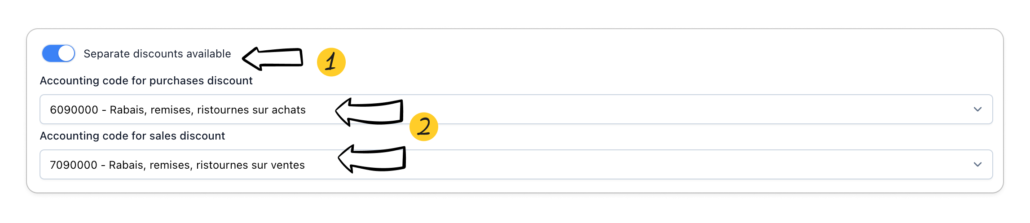
- Enable feature
- Define the accounting codes on which to break down the discounts granted on purchases and sales (By default the codes 6090000 and 7090000 are proposed)
Here is an example with separate accounting breakdown of discounts activated and not activated:
A company sells goods for €10,000 excluding tax and applies a 5% discount. VAT is 20%.
Invoice details:
- Gross amount excluding tax: €10,000
- Commercial discount (5%): -€500
- Net amount excluding tax after discount: €9,500
- VAT (20%): €1,900
- Total including tax to pay: €11,400
With separate distribution of discounts:
| DATE | ACCOUNT | DESCRIPTION | DEBIT (€) | CREDIT (€) |
|---|---|---|---|---|
| DD/MM/YYYY | 411 | Customers | 11,400 | |
| DD/MM/YYYY | 707 | Sales of goods | 10,000 | |
| DD/MM/YYYY | 709 | Discounts granted | 500 | |
| DD/MM/YYYY | 44571 | Collected VAT | 1,900 |
Without separate breakdown of discounts:
| Date | ACCOUNT | DESCRIPTION | DEbit (€) | CrEdit (€) |
|---|---|---|---|---|
| DD/MM/YYYY | 411 | Customers | 11 400 | |
| DD/MM/YYYY | 707 | Sales of goods | 9 500 | |
| DD/MM/YYYY | 44571 | Collected VAT | 1 900 |
Accounting configuration of withholding guarantees
Retainage is an amount that a customer temporarily holds back from the total amount owed to a supplier or service provider. It serves to guarantee the proper execution of the contract and to cover possible defects, poor workmanship or non-conformities noted after delivery of the goods or completion of the services.
The retention percentage is generally 5% of the invoice amount depending on your activity.
If no anomaly is noted at the end of the warranty period, the amount is refunded by the customer.
This functionality is only offered on progress invoices
To configure this functionality you can define:
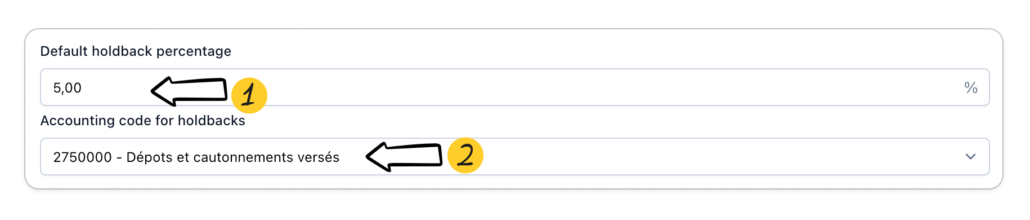
- The default retainage rate
- Define the accounting codes on which to break down the security holdback (By default code 2750000 – Deposits and guarantees paid and proposed)